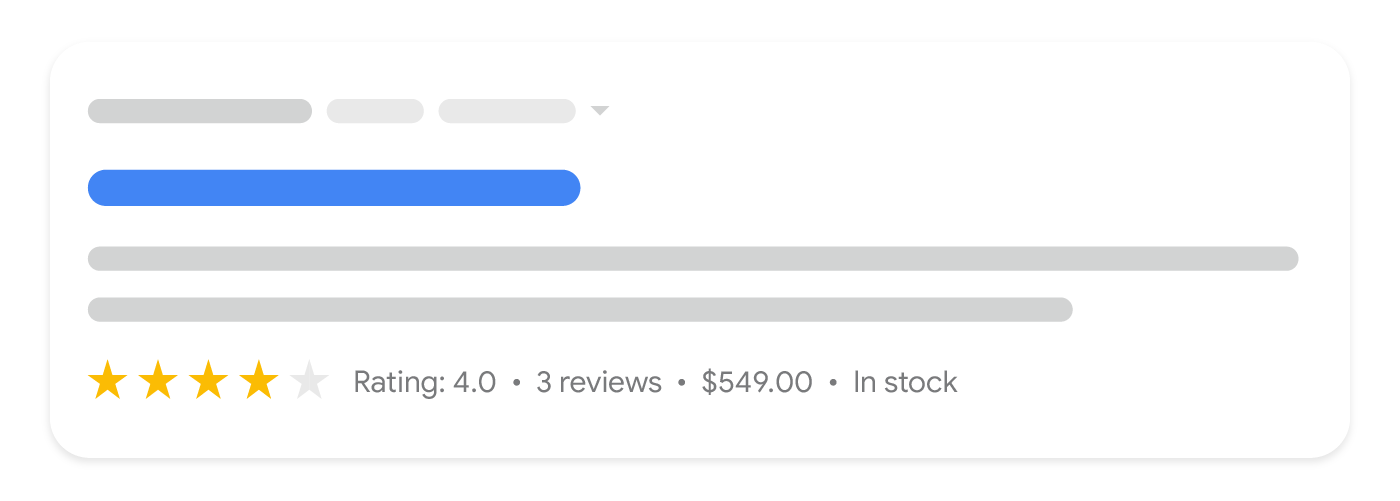
Lorsque vous ajoutez Product à votre page, elle peut être éligible à un affichage sous forme d’extrait de produit, qui est un résultat textuel
incluant des informations supplémentaires sur le produit telles que les notes, les avis, le prix et la disponibilité.
Ce guide se concentre sur les exigences en matière de données structurées Product pour les extraits de produit. Si vous ne savez pas quel balisage utiliser, lisez notre
introduction aux Product balisage.
Comment ajouter des données structurées
Les données structurées sont un format standardisé permettant de fournir des informations sur une page et de classer son contenu. Si vous débutez avec les données structurées, vous pouvez en savoir plus sur
le fonctionnement des données structurées.
Voici un aperçu de la manière de créer, tester et publier des données structurées.
- Ajoutez les propriétés requises. Selon le format que vous utilisez, apprenez où insérer des données structurées sur la page.
- Suivez les directives.
- Validez votre code à l’aide de l’outil
Test des résultats enrichis
et corrigez toute erreur critique. Pensez également à corriger les problèmes non critiques signalés par l’outil, car ils peuvent contribuer à améliorer la qualité de vos données structurées (ceci n’est toutefois pas nécessaire pour être éligible aux résultats enrichis). - Déployez quelques pages incluant vos données structurées et utilisez l’outil d’inspection d’URL pour tester la façon dont Google voit la page. Assurez-vous que votre page est accessible à Google et qu’elle n’est pas bloquée par un fichier robots.txt, la balise
noindexou des exigences de connexion. Si la page semble correcte, vous pouvez
demander à Google de recrawler vos URL. - Pour tenir Google informé des changements futurs, nous vous recommandons de
soumettre un sitemap. Vous pouvez automatiser cela avec l’API
Search Console Sitemap.
Exemples
Les exemples suivants illustrent comment inclure des données structurées sur vos pages web pour différentes situations.
Page d’avis produit
Voici un exemple de données structurées sur une page d’avis produit pour le traitement des extraits de produit dans les résultats de recherche.
JSON-LD
RDFa
Microdata
Avantages et inconvénients
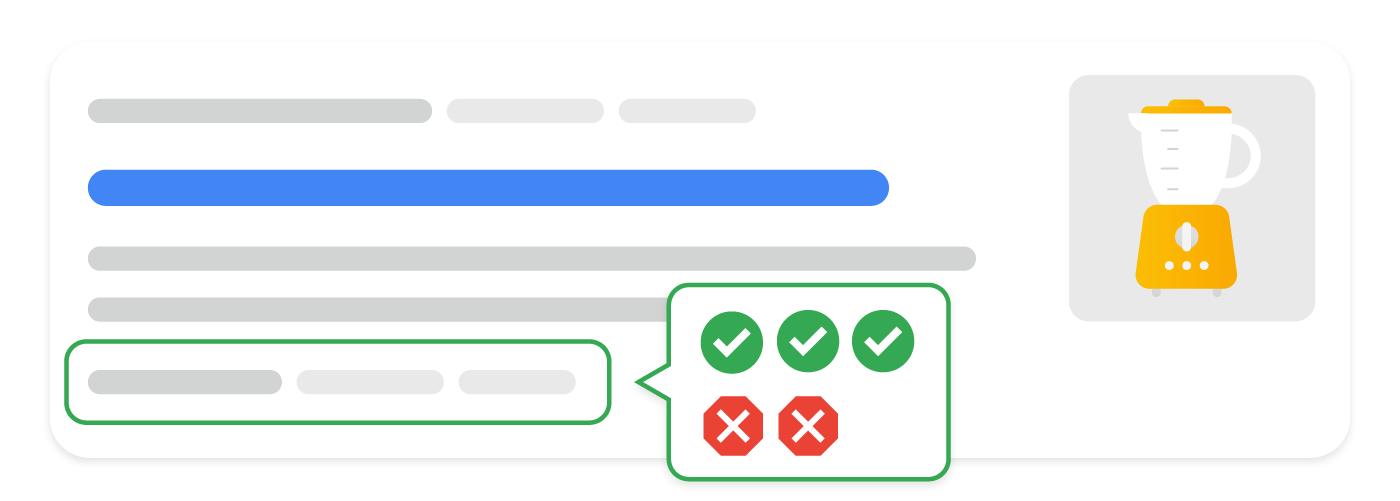
Voici un exemple de page d’avis produit éditorial avec des avantages et des inconvénients pour le traitement des extraits de produit dans les résultats de recherche.
JSON-LD
RDFa
Microdata
Page d’agrégateur commercial
Voici un exemple de page d’agrégateur commercial pour le traitement des extraits de produit dans les résultats de recherche.
JSON-LD
RDFa
Microdata
Directives
Pour que votre balisage Product soit éligible aux extraits de produit, vous devez suivre ces directives :
- Directives générales sur les données structurées
- Principes de base de la recherche
- Directives techniques
- Directives relatives au contenu
Directives techniques
- Actuellement, les résultats enrichis sur les produits ne prennent en charge que les pages axées sur un seul produit (ou plusieurs variantes du même produit). Par exemple, « chaussures dans notre boutique » n’est pas un produit spécifique.Cela inclut les variantes de produits où
- chaque variante de produit possède une URL distincte ..
- Nous recommandons de concentrer l’ajout de balisage sur les pages produits plutôt que sur les pages listant des produits ou une catégorie de produits.
Pour plus de détails sur la façon de baliser les variantes de produits, consultez
la documentation sur les données structurées des variantes de produitsLorsque vous proposez des produits à la vente dans plusieurs devises, utilisez une URL distincte par devise.Par exemple, si un produit est disponible à la vente en dollars canadiens et américains, utilisez deuxURL distinctes, une par devise.Car
n'est pas automatiquement pris en charge en tant que sous-type deProduct- . Pour l’instant, incluez à la fois les types Caret
- Product
si vous souhaitez y associer des évaluations et être éligible à la fonctionnalité de recherche. Par exemple en JSON-LD :Pour - les avantages et les inconvénients
données structurées:Seules les pages d’avis éditoriaux sur les produits sont éligibles à l’affichage des avantages et inconvénients dans la Recherche, pas les pages produits des marchands ou les avis clients sur les produits.
Si vous êtes un marchand optimisant pour tous les types de résultats d’achat, nous vous recommandons d’insérerdes données structuréesProduct
dans le HTML initial pour de meilleurs résultats.
- Pour le balisage
Product
généré par JavaScript
: Sachez que
le balisage généré dynamiquement peut rendre les explorations Shopping moins fréquentes et moins fiables, ce qui peut poser problème pour le contenu changeant rapidement comme la disponibilité et le prix des produits. Si vous utilisez JavaScript pour
générer le balisageProduct
, assurez-vous que votre serveur dispose de suffisamment de ressources informatiques pour gérer l’augmentation du trafic provenant de Google.
| Directives de contenu | |
|---|---|
Nous n'autorisons pas le contenu qui promeut des biens, services ou informations largement interdits ou réglementés qui peuvent faciliter des dommages graves, immédiats ou à long terme pour les personnes. Cela | Définitions des types de données structurées |
Vous devez inclure les propriétés requises pour que votre contenu soit éligible à l’affichage en tant que résultat enrichi. Vous pouvez également inclure les propriétés recommandées pour ajouter plus d'informations à vos données structurées, ce qui pourrait offrir une meilleure expérience utilisateur. Product La définition complète de Product | est disponible sur
|
| Vous devez inclure l’une des propriétés suivantes : | |
|---|---|
review | offers |
extraits de produits du test des résultats enrichis peut signaler un avertissement si vous fournissez | Un Pour être éligible à l’amélioration price drop, utilisez |
avis | Un Si vous ajoutez un avis pour le produit, le nom de l’évaluateur doit être un nom valide pour une Non recommandé: 50 % de réduction le Black Friday Recommandé: “James Smith” ou “CNET Reviewers” Pour indiquer manuellement à Google les avantages et inconvénients d’une page d’avis éditorial sur un produit, ajoutez les propriétés |
Avis sur les produits
Review
Comme les avis sont partagés par plusieurs types de données structurées (tels que
Recipe et
Movie), le type
Review est décrit séparément dans la
documentation sur les extraits d’avis.
Les propriétés suivantes sont des propriétés supplémentaires pour le type Review afin d’aider les utilisateurs à voir un résumé général des avantages et des inconvénients d’un avis éditorial sur un produit. L’expérience des avantages et inconvénients est disponible en néerlandais, anglais, français, allemand, italien, japonais, polonais, portugais, espagnol et turc dans tous les pays où la recherche Google est disponible.
Bien que Google essaie de comprendre automatiquement les avantages et les inconvénients d’un avis éditorial sur un produit, vous pouvez fournir explicitement ces informations en ajoutant les propriétés positiveNotes et/ou
negativeNotes à votre avis produit imbriqué. Assurez-vous de suivre les
directives sur les avantages et les inconvénients.
| Propriétés requises | |
|---|---|
| Deux déclarations sur le produit | Vous devez fournir au moins deux déclarations sur le produit dans n’importe quelle combinaison de déclarations positives ou négatives (par exemple, un balisage ItemList avec deux déclarations positives est valide) : |
| Propriétés recommandées | |
|---|---|
negativeNotes |
Une liste imbriquée facultative de déclarations négatives sur le produit (inconvénients). Pour lister plusieurs déclarations négatives, spécifiez plusieurs propriétés |
positiveNotes |
Une liste imbriquée facultative de déclarations positives sur le produit (points forts). Pour lister plusieurs déclarations positives, spécifiez plusieurs |
ItemList pour les notes positives et négatives
Les notes positives et négatives (points forts et points faibles) à l’intérieur du type Review utilisent ItemList et ListItem types.
Cette section décrit comment utiliser ces types pour les notes positives et négatives.
Les propriétés suivantes sont utilisées pour capturer les points forts et les points faibles dans un avis.
| Propriétés obligatoires | |
|---|---|
itemListElement | Une liste de déclarations concernant le produit, listées dans un ordre spécifique. |
itemListElement.name | La déclaration clé de l’avis. |
| Propriétés recommandées | |
|---|---|
itemListElement.position | La position de l’avis. La position 1 désigne la première déclaration de la liste. |
Détails de l’offre
Offer
La définition complète de Offer est disponible sur
schema.org/Offer. Lors du balisage
des offres dans un produit, utilisez les propriétés suivantes du type schema.org
Offer .
| Propriétés obligatoires | |
|---|---|
price ou priceSpecification.price | Le prix de l’offre d’un produit. Suivez Voici un exemple de la propriété Voici un exemple montrant comment indiquer qu’un produit est disponible sans paiement : Alternativement, le prix de l’offre peut être imbriqué dans une propriété |
| Propriétés recommandées | |
|---|---|
availability | Utilisez la seule option de disponibilité de produit la plus appropriée parmi la liste suivante.
Les noms courts sans le préfixe URL sont également pris en charge (par exemple, |
priceCurrency ou priceSpecification.priceCurrency | La devise utilisée pour décrire le prix du produit, au format trois lettres Cette propriété est actuellement recommandée pour les extraits de produits afin d’aider Google à déterminer la devise avec plus de précision, mais elle est requise pour les expériences de référencement marchand. Il est donc préférable de toujours fournir cette propriété. |
priceValidUntil | La date (au format ISO 8601 |
UnitPriceSpecification
La définition complète de UnitPriceSpecification est disponible sur
schema.org/UnitPriceSpecification. Utilisez les propriétés suivantes pour capturer des schémas de tarification plus complexes.
| Propriétés requises | |
|---|---|
price | Le prix de l’offre d’un produit. Voir aussi la propriété |
| Propriétés recommandées | |
|---|---|
priceCurrency | La devise utilisée pour décrire le prix du produit, au format trois lettres Bien que cette propriété soit facultative pour les extraits de produits, elle est fortement recommandée car elle évite les ambiguïtés de prix et est requise pour les expériences de référencement marchand. |
AggregateOffer
La définition complète de AggregateOffer est disponible sur
schema.org/AggregateOffer. Une AggregateOffer est un type d’ Offer représentant un regroupement d’autres offres. Par exemple, elle peut être utilisée pour un produit vendu par plusieurs marchands. N’utilisez pas AggregateOffer pour décrire un ensemble de variantes de produits. Lors du balisage d’offres agrégées au sein d’un produit, utilisez les propriétés suivantes du type schema.org
AggregateOffer :
| Propriétés requises | |
|---|---|
lowPrice | Le prix le plus bas parmi toutes les offres disponibles. Utilisez un séparateur décimal (“.”) pour exprimer les fractions d’une unité monétaire, comme 1.23 pour 1,23 dollar américain. |
ru | La devise utilisée pour décrire le prix du produit, au format |
| Propriétés recommandées | |
|---|---|
highPrice | Le prix le plus élevé parmi toutes les offres disponibles. Utilisez un nombre à virgule flottante si nécessaire. |
offerCount | Le nombre d’offres pour le produit. |
Surveillez les résultats enrichis avec la Search Console
La Search Console est un outil qui vous aide à surveiller les performances de vos pages dans la recherche Google. Vous n’avez pas besoin de vous inscrire à la Search Console pour être inclus dans les résultats de recherche Google, mais cela peut vous aider à comprendre et à améliorer la façon dont Google voit votre site. Nous recommandons de vérifier la Search Console dans les cas suivants :
- Après avoir déployé des données structurées pour la première fois
- Après avoir publié de nouveaux modèles ou mis à jour votre code
- Analyse périodique du trafic
Après avoir déployé des données structurées pour la première fois
Une fois que Google a indexé vos pages, recherchez les problèmes à l’aide du
Rapport sur l’état des résultats enrichis. Idéalement, il y aura une augmentation des éléments valides et aucune augmentation des éléments invalides. Si vous trouvez des problèmes dans vos données structurées :
- Corrigez les éléments invalides.
- Inspectez une URL en direct pour vérifier si le problème persiste.
- Demandez une validation en utilisant le rapport d’état.
Après avoir publié de nouveaux modèles ou mis à jour votre code
Lorsque vous apportez des modifications importantes à votre site Web, surveillez l’augmentation des éléments de données structurées invalides.
- Si vous constatez une augmentation des éléments invalides, peut-être avez-vous déployé un nouveau modèle qui ne fonctionne pas, ou votre site interagit avec le modèle existant d’une manière nouvelle et incorrecte.
- Si vous constatez une diminution des éléments valides (non compensée par une augmentation des éléments invalides), peut-être n’intégrez-vous plus de données structurées dans vos pages. Utilisez l’outil
Inspection d’URL pour savoir ce qui cause le problème.
Analyse périodique du trafic
Analysez votre trafic de recherche Google à l’aide du Rapport sur les performances. Les données vous montreront à quelle fréquence votre page apparaît comme un résultat enrichi dans la recherche, à quelle fréquence les utilisateurs cliquent dessus et quelle est la position moyenne que vous occupez dans les résultats de recherche. Vous pouvez également extraire automatiquement ces résultats avec l’API Search Console API.
Il existe deux rapports Search Console liés aux données structurées Product :
- Rapport sur les fiches marchandes: Pour les pages où les acheteurs peuvent acheter des produits.
- Rapport sur les extraits de produit: Pour les autres pages liées aux produits, telles que les avis sur les produits et les sites agrégateurs.
Les deux rapports fournissent des avertissements et des erreurs liés aux données structurées Product , mais sont distincts en raison des exigences différentes pour les expériences associées. Par exemple, le
Rapport sur les fiches marchandes
inclut des vérifications pour les extraits de produit qui incluent des données structurées Offer
, donc le rapport sur les
Product snippets
n’a besoin d’être consulté que pour les pages qui ne sont pas des fiches marchandes.
Dépannage
Si vous rencontrez des difficultés pour implémenter ou déboguer des données structurées, voici quelques ressources qui pourraient vous aider.
- Si vous utilisez un système de gestion de contenu (CMS) ou si quelqu’un d’autre s’occupe de votre site, demandez-lui de l’aide. Assurez-vous de lui transmettre tout message de la Search Console détaillant le problème.
- Google ne garantit pas que les fonctionnalités qui utilisent des données structurées apparaîtront dans les résultats de recherche. Pour obtenir une liste des raisons courantes pour lesquelles Google peut ne pas afficher votre contenu dans un résultat enrichi, consultez les
Directives générales sur les données structurées. - Vous pourriez avoir une erreur dans vos données structurées. Vérifiez la
liste des erreurs de données structurées
et le Rapport sur les données structurées non analysables. - Si vous avez reçu une action manuelle sur les données structurées concernant votre page, les données structurées sur la page seront ignorées (bien que la page puisse toujours apparaître dans les résultats de recherche Google). Pour corriger les
problèmes de données structurées, utilisez le Rapport sur les actions manuelles. - Examinez à nouveau les directives pour identifier si votre contenu n’est pas conforme aux directives. Le problème peut être causé soit par un contenu indésirable, soit par une utilisation indésirable du balisage. Cependant, le problème peut ne pas être un problème de syntaxe, et le test des résultats enrichis ne pourra donc pas identifier ces problèmes.
- Dépannage des résultats enrichis manquants / baisse du nombre total de résultats enrichis.
- Laissez le temps au ré-exploration et à la ré-indexation. N’oubliez pas qu’il peut s’écouler plusieurs jours après la publication d’une page pour que Google la trouve et l’explore. Pour des questions générales sur l’exploration et l’indexation, consultez la
FAQ sur l’exploration et l’indexation de la recherche Google. - Posez une question dans le Forum Google Search Central.
Comment nous l'appliquons
Product snippets show price, availability and rating in results. Keeping availability accurate is the hard part, and inaccurate stock data damages click-through quality more than the snippet helps.
Services associés