Четверг, 7 августа 2008 г.
Вы когда-нибудь задумывались о создании одного или нескольких сайтов на разных языках? Предположим, вы хотите запустить туристический сайт о пешем туризме в Европе и хотите предложить свой контент англо-, немецко- и испаноязычным пользователям. Вам нужно будет учитывать такие факторы, как структура сайта, географический и языковой таргетинг, а также организация контента.

Структура сайта
Первое, о чем вам стоит подумать, имеет ли смысл покупать специфичные для конкретной страны домены верхнего уровня (TLD) для всех стран, которые вы планируете обслуживать. Таким образом, вашими доменами могут быть
ilovebackpacking.co.uk, ichlieberucksackreisen.de, и
irdemochilero.es. Этот вариант полезен, если вы хотите ориентироваться на страны, с которыми связан каждый TLD, — метод, известный как геотаргетинг. Обратите внимание, что это отличается от языкового таргетинга, о котором мы поговорим чуть позже. Предположим, ваш немецкоязычный контент предназначен специально для пользователей из Германии и не так актуален для немецкоязычных пользователей в Австрии или Швейцарии. В этом случае вы захотите зарегистрировать домен на .de TLD. Немецкие пользователи будут идентифицировать ваш сайт как местный, которому они с большей вероятностью доверяют. С другой стороны, покупка доменов в доменных зонах конкретных стран может быть довольно дорогой, а обновление и поддержка нескольких доменов доставляют больше хлопот. Поэтому, если ваше время и ресурсы ограничены, подумайте о покупке одного домена, не привязанного к конкретной стране, на котором будут размещаться все различные версии вашего веб-сайта. В этом случае мы рекомендуем один из этих двух вариантов:
- Разместите контент каждого языка на отдельном поддомене. В нашем примере у вас будет
en.example.com,de.example.com, иes.example.com. - Разместите контент каждого языка в отдельной подпапке. Это проще контролировать при обновлении и обслуживании вашего сайта. В нашем примере у вас будет
example.com/en/,example.com/de/, иexample.com/es/.
Мэтт Каттс написал содержательную статью о
подпапках и поддоменах, которая может помочь вам решить, какой вариант выбрать.
Географический таргетинг против языкового таргетинга
Как упоминалось выше, если ваш контент ориентирован на определенный регион мира, вы можете использовать
инструмент «Установка географического целевого региона» в Webmaster Tools. Он позволяет устанавливать разные географические цели для разных подпапок или поддоменов (например, /de/ для Германии).
Если вы хотите охватить всех носителей определенного языка по всему миру, вы, вероятно, не захотите ограничивать себя конкретным географическим местоположением. Это известно как языковой таргетинг, и в этом случае вам не нужно использовать инструмент географического таргетинга.
Организация контента
Один и тот же контент на разных языках не считается дублированным. Просто убедитесь, что все упорядочено. Если вы будете следовать одной из рекомендаций по структуре сайта, упомянутых выше, это должно быть довольно просто. Избегайте смешивания языков на каждой странице, так как это может запутать Googlebot, а также ваших пользователей. Сохраняйте навигацию и контент на одном и том же языке на каждой странице.
Если вы хотите проверить, сколько ваших страниц распознается на определенном языке, вы можете выполнить языковой поиск по сайту. Например, если вы перейдете на
google.de
и выполните поиск по сайту на google.com, выберите опцию под строкой поиска для отображения только результатов на немецком языке.
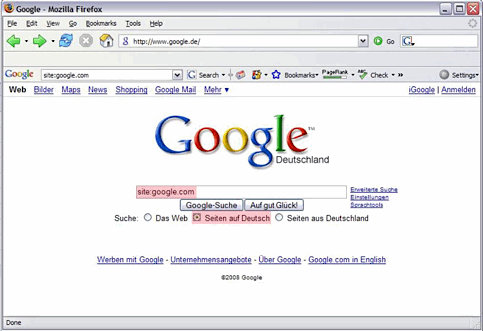
Если у вас есть дополнительные вопросы по этой теме, вы можете присоединиться к нашей
Группе помощи веб-мастерам
, чтобы получить больше советов.
Как мы это применяем
Google announcements age. We keep this post here for the record, and we note for clients whether the behaviour it describes still applies today or has since been superseded.
Связанные услуги