Çərşənbə axşamı, 01 Aprel, 2008
Bəzən
müzakirə qrupunda,
veb-ustalar soruşurlar: “Mən Google Webmaster Tools, yoxsa Google Analytics istifadə etməliyəm?” Bizim cavabımız:
hər ikisini istifadə edin! Budur, hər iki alətin gücünü həqiqətən nümayiş etdirən üç ssenari.
Təəssüratlarınızdan maksimum yararlanın
Webmaster Tools-un sevdiyim xüsusiyyətlərindən biri odur ki, o, saytınızın göründüyü Ən Yaxşı 20 axtarış sorğusunu
Ən Yaxşı Axtarış Sorğuları
saytınızın hansı axtarışlarda göründüyünü və bu axtarışlardan hansının kliklərlə nəticələndiyini tez müəyyən etməyə imkan verir. Nümunə olaraq www.google.com/webmasters üçün keçən həftəki məlumatlara baxaq.
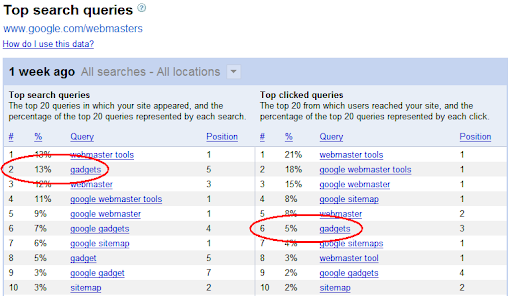
Gördüyünüz kimi, Google Webmaster Central “qadjetlər” sorğusu üçün çoxlu sayda təəssürat alır, lakin istifadəçi klikləri ilə bu təəssüratlardan tam şəkildə yararlana bilməyə bilər. Saytımızın axtarış nəticələrində necə göründüyünü görmək üçün “qadjetlər” üzərinə klikləyin. Başlığınız və fraqmentiniz istifadəçilərə cəlbedici görünür? Əməkdaşım Mayklın bu yaxınlarda yazdığı kimi, vebsaytınızda bəzi
“baxım” işləri görməyin vaxtı ola bilər — bu, istifadəçilərinizin diqqətini cəlb etmək üçün əla, az xərcli və ya xərcsiz üsuldur. Məsələn, biz
fraqmentimizi təkmilləşdirmək üçün işləyə bilərik
şəklindən:
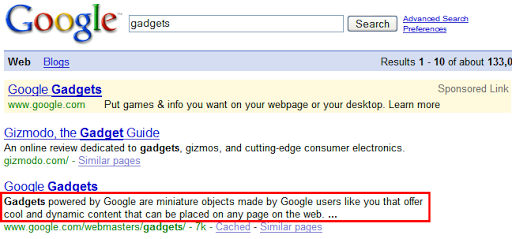
URL-ə meta təsvir əlavə etməklə “Saytınıza sərin, dinamik məzmunu asanlıqla əlavə etmək üçün qadjetlərdən istifadə edin…” kimi daha oxunaqlı bir formaya sala bilərik.
Və istifadəçilər sizin saytınıza baş çəkdikdə nə edirlər? Onlar məzmununuza baxırlar, yoxsa saytınızdan tez çıxırlar? Bunu öyrənmək üçün Google Analytics saytınızın “imtina dərəcəsini” (və ya tək səhifəlik ziyarətlərin faizini, məsələn, kimsə sadəcə ana səhifənizə baş çəkib sonra gedirsə) hesablayacaq. Bu, saytınızın eniş səhifəsinin və saytınızın aldığı trafikin keyfiyyətinin faydalı ölçüsü ola bilər. Axı, istifadəçilərinizi saytınızı ziyarət etməyə vadar etmək üçün çox çalışdıqdan sonra, onları orada saxlamaq istəyirsiniz! Haqqında ətraflı məlumat üçün Analytics bloqunu yoxlayın
“imtina dərəcəsi.”
Ağıllı GEO-hədəfləmə həyata keçirin
Tutaq ki, siz Yaponiya bazarına yönəltmək istədiyiniz .com domeniniz var. Webmaster Tools sizə imkan verir
coğrafi hədəf təyin etmək
saytınız üçün, burada yəqin ki, Yaponiyanı seçərdiniz. Lakin bunu etmək dərhal həll yolu deyil. Siz şəhər səviyyəsinə qədər Analytics xəritə örtüyündən istifadə edərək ziyarətçilərinizin yerini təsdiq edə bilərsiniz. Siz həmçinin saytınıza daxil olan istifadəçilərin növlərini, o cümlədən onların brauzerini və bağlantı sürətini öyrənə bilərsiniz. İstifadəçilər uyğun gəlməyən brauzer və ya daha yavaş bağlantı sürəti səbəbindən vebsaytınıza daxil ola bilmirsə, vebsaytınızın dizaynını yenidən nəzərdən keçirməli ola bilərsiniz. Bunu etmək istədiyiniz müvafiq trafik səviyyəsinə nail olmaqda çox kömək edə bilər.
Həssas məzmuna girişi idarə edin
Bir gün siz Analytics-ə daxil olub “Məzmun Başlığına görə” məlumatlarınıza baxırsınız. Şoka düşərək istifadəçilərinizi ziyarət etdiyini kəşf edirsiniz /privatedata səhifələr. Qorxmayın! Webmaster Tools-a daxil olun və istifadə edin
URL silmə aləti
həmin səhifələri Google-un axtarış nəticələrindən silmək üçün. Robots.txt faylınızı dəyişdirmək həmçinin Googlebot-un gələcəkdə saytınızın həmin bölməsini taramasını bloklayacaq.
Analytics üzrə daha çox məsləhət və tövsiyələr üçün baxın
Analytics Yardım Mərkəzi.
Əlavə təklifləriniz varsa, bizim ünvanımızda dərc edə bilərsiniz
Veb-usta Yardım Qrupu.
Bunu necə tətbiq edirik
Google announcements age. We keep this post here for the record, and we note for clients whether the behaviour it describes still applies today or has since been superseded.
Əlaqəli xidmətlər