Sosyal mühendislik, ziyaretçileri gizli bilgileri ifşa etmek veya yazılım indirmek gibi tehlikeli bir şey yapmaya ikna eden içeriktir. Google, web sitenizin sosyal mühendislik içeriği barındırdığını tespit ederse, Chrome tarayıcısı ziyaretçiler sitenizi görüntülediğinde “İleride aldatıcı site var” uyarısını gösterebilir. Search Console’daki Güvenlik Sorunları raporunu ziyaret ederek sitenizdeki herhangi bir sayfanın sosyal mühendislik saldırıları içerdiğinden şüphelenilip şüphelenilmediğini kontrol edebilirsiniz.
Güvenlik Sorunları Raporunu
açın
Sosyal mühendislik nedir?
A sosyal mühendislik saldırısı bir web kullanıcısının çevrimiçi ortamda tehlikeli bir şey yapması için kandırılmasıdır.
Farklı sosyal mühendislik saldırısı türleri vardır:
- Kimlik avı:
Site, kullanıcıları kişisel bilgilerini (örneğin şifreler, telefon numaraları veya sosyal güvenlik numaraları) ifşa etmeleri için kandırır. Bu durumda içerik; tarayıcı, işletim sistemi, banka veya devlet kurumu gibi güvenilir bir kurum gibi davranır ya da öyle görünür. - Aldatıcı içerik: İçerik, sizi yalnızca güvenilir bir kurum için yapacağınız bir şeyi yapmaya ikna etmeye çalışır; örneğin şifre paylaşmak, teknik desteği aramak, yazılım indirmek veya cihaz yazılımının güncel olmadığını yanlış bir şekilde iddia ederek kullanıcıları istenmeyen yazılımları yüklemeye teşvik eden bir reklam içermek.
- Yetersiz etiketlenmiş üçüncü taraf hizmetleri: A üçüncü taraf hizmeti
başka bir kurum adına site veya hizmet işleten kişidir. Siz (üçüncü taraf), başka bir taraf (birinci taraf) adına, aranızdaki ilişkiyi netleştirmeden bir site işletiyorsanız, bu durum sosyal mühendislik olarak işaretlenebilir. Örneğin, bir yardım kuruluşu web sitesi işletiyorsanız (birinci taraf) ve siteniz için bağışları yönetmek üzere bir bağış yönetimi web sitesi (üçüncü taraf) kullanıyorsanız, bağış sitesi o yardım kuruluşu sitesi adına hareket eden bir üçüncü taraf platformu olduğunu açıkça belirtmelidir; aksi takdirde sosyal mühendislik olarak kabul edilebilir.
Google Güvenli
Gezinme sürekli olarak sosyal mühendislik faaliyetlerinde bulunan sayfaları ziyaret etmeden önce kullanıcıları uyararak web kullanıcılarını korur.
Web sayfaları, aşağıdaki durumlarda sosyal mühendislik olarak kabul edilir:
- Kendi cihazınız, tarayıcınız veya web sitesinin kendisi gibi güvenilir bir kurum gibi davranmak veya öyle görünmek ya da
- Şifre paylaşmak, teknik destek numarasını aramak veya yazılım indirmek gibi yalnızca güvenilir bir kurum için yapacağınız bir şeyi yapmanız için sizi kandırmaya çalışmak.
Gömülü içerikte sosyal mühendislik
Sosyal mühendislik, genellikle reklamlarda olmak üzere, başka türlü zararsız web sitelerine gömülü içeriklerde de görünebilir. Gömülü sosyal mühendislik içeriği, barındıran sayfa için bir politika ihlalidir.
Bazen gömülü sosyal mühendislik içeriği, kullanıcılara barındıran sayfada görünür olacaktır, bunun örneklerigösterilmiştir. Diğer durumlarda, barındıran site görünür reklamlar içermez ancak kullanıcıları pop-up’lar, pop-under’lar veya diğer yönlendirme türleri aracılığıyla sosyal mühendislik sayfalarına yönlendirir. Her iki durumda da, bu tür gömülü sosyal mühendislik içeriği, barındıran sayfa için bir politika ihlaline yol açacaktır.
Ama ben sosyal mühendislik yapmıyorum!
Aldatıcı sosyal mühendislik içeriği, görseller, diğer üçüncü taraf bileşenleri veya reklamlar gibi sayfaya gömülü kaynaklar aracılığıyla dahil edilebilir. Bu tür aldatıcı içerikler, site ziyaretçilerini istenmeyen
yazılım.
indirmeye ikna edebilir. Ayrıca, bilgisayar korsanları masum sitelerin kontrolünü ele geçirebilir ve bunları sosyal mühendislik içeriği barındırmak veya dağıtmak için kullanabilirler. Bilgisayar korsanı, sitenin içeriğini değiştirebilir veya siteye ek sayfalar ekleyebilir; genellikle ziyaretçileri kredi kartı numaraları gibi kişisel bilgileri vermeleri için kandırma niyetiyle. Sitenizin sosyal mühendislik içeriği barındıran veya dağıtan bir site olarak tanımlanıp tanımlanmadığını, Search Console’daki Güvenlik Sorunları raporunu kontrol ederek öğrenebilirsiniz.
Sitenizin saldırıya uğradığını düşünüyorsanız Saldırıya Uğramış Siteler için Yardım bölümümüze bakın.
Sosyal mühendislik ihlali örnekleri
Aldatıcı içerik örnekleri
İşte sosyal mühendislik uygulamalarında bulunan sayfalara bazı örnekler:
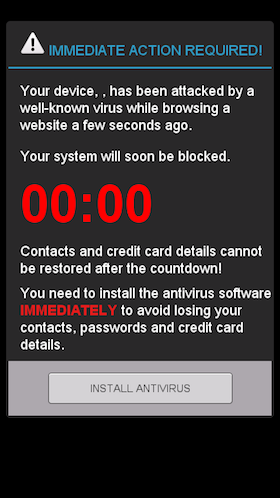
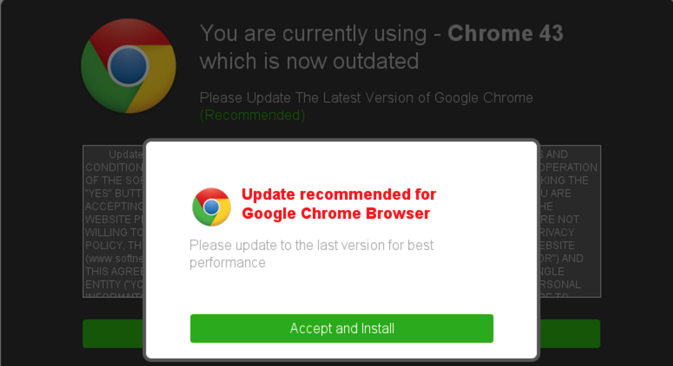
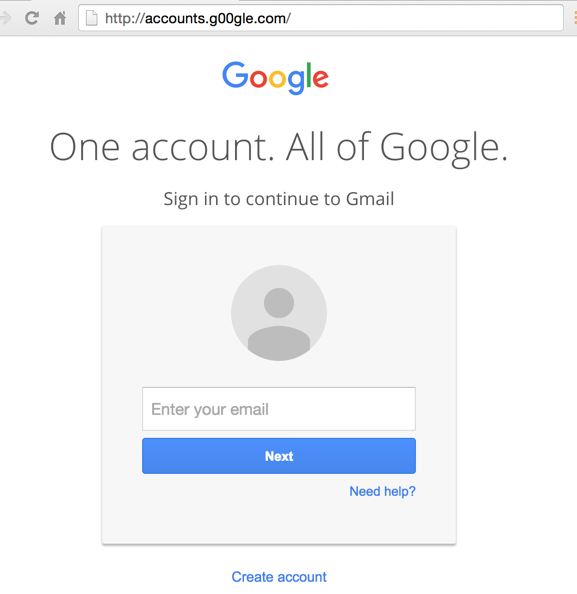
ile başladığını kontrol edin.
Aldatıcı reklam örnekleri
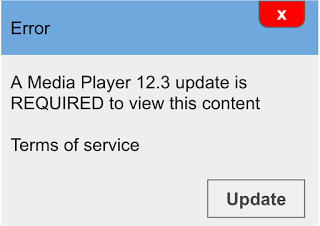
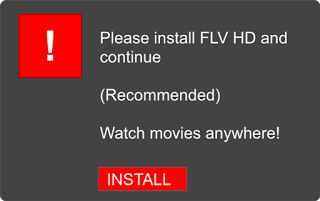

Sayfa eylem düğmeleri gibi görünen reklamlar.
Sorunu çözme Siteniz sosyal mühendislik (aldatıcı içerik) içerdiği için işaretlenmişse, sayfanızınuygulamalardan
- hiçbirini içermediğinden emin olun ve ardından şu adımları izleyin:.
- Search Console’da kontrol edin
Sitenizin Search Console’da size ait olduğunu doğrulayın ve yeni, şüpheli sahiplerin eklenmediğinden emin olun.
Sitenizin aldatıcı içerik (sosyal mühendislik için raporlama terimi) içerip içermediğini görmek için
Güvenlik Sorunları raporunukontrol edin. Rapor örnek işaretlenmiş URL’ler içeriyorsa, raporda listelenen bu URL’lerden bazılarını ziyaret edin, ancak web sitenize hizmet veren ağın dışındaki bir bilgisayarı kullanın (zeki bilgisayar korsanları, ziyaretçinin site sahibi olduğunu düşünürlerse saldırılarını devre dışı bırakabilirler).
Rapor örnek URL’ler içermiyorsa ve sitenizin sosyal mühendislik (aldatıcı içerik) içermediğinden eminseniz,
Güvenlik Sorunları raporunda
- Search Console’da kontrol edin
- bir güvenlik incelemesi isteyin.Aldatıcı içeriği kaldırın
. Sitenizin hiçbir sayfasının aldatıcı içerik barındırmadığından emin olun. Güvenli Gezinme’nin bir web sayfasını yanlışlıkla sınıflandırdığını düşünüyorsanız,. - bunu bildirin. Sitenizde yer alan üçüncü taraf kaynakları kontrol edin
- . Sitenizin sayfalarındaki reklamların, görsellerin veya diğer gömülü üçüncü taraf kaynakların aldatıcı olmadığından emin olun.
- Reklam ağlarının sitenizin sayfalarında gösterilen reklamları değiştirebileceğini unutmayın. Bu nedenle, herhangi bir sosyal mühendislik reklamının göründüğünü görebilmeniz için bir sayfayı birkaç kez yenilemeniz gerekebilir. Bazı reklamlar mobil cihazlarda ve masaüstü bilgisayarlarda farklı görünebilir. Sitenizi hem mobil hem de masaüstü görünümlerinde görüntülemek için URL
Denetleme aracını - kullanabilirsiniz. Sitenizde kullandığınız ödeme hizmetleri gibi tüm üçüncü taraf hizmetleri için üçüncü taraf hizmet yönergelerini
- izleyin.İnceleme isteyin
. Sitenizdeki tüm sosyal mühendislik içeriğini kaldırdıktan sonra,
Güvenlik Sorunları raporunda
bir güvenlik incelemesi isteyebilirsiniz. Bir incelemenin tamamlanması birkaç gün sürebilir.
Üçüncü taraf hizmet yönergeleri
- Sitenize bir üçüncü taraf hizmeti dahil ederseniz, sosyal mühendislik olarak etiketlenmekten kaçınmak için aşağıdaki koşulları karşılamanızı öneririz:
- Her sayfada, üçüncü taraf site, kullanıcıların siteyi kimin işlettiğini anlamasını sağlayacak şekilde üçüncü taraf markasını açıkça içerir. Örneğin, sayfanın üst kısmına üçüncü taraf markasını ekleyerek.
Birinci taraf markalaması içeren her sayfada, birinci ve üçüncü taraf arasındaki ilişkiyi açıkça belirtin ve daha fazla bilgi için bir bağlantı sağlayın. Örneğin, şöyle bir ifade:
Bu hizmet, Example.charities.com adına Example.com tarafından barındırılmaktadır. Daha fazla bilgi.
OAuth
Biz bunu nasıl uyguluyoruz
Phishing flags are reputationally severe and can be triggered by legitimate design patterns. We review login and payment flows against these guidelines for clients handling sensitive data.
İlgili hizmetler