Вы можете улучшить опыт поиска работы, добавив JobPosting структурированные данные на свои страницы с вакансиями. Добавление структурированных данных делает ваши вакансии подходящими для отображения в специальном интерфейсе результатов поиска Google. Вы также можете интегрироваться с Google,
используя сторонний сайт вакансий.
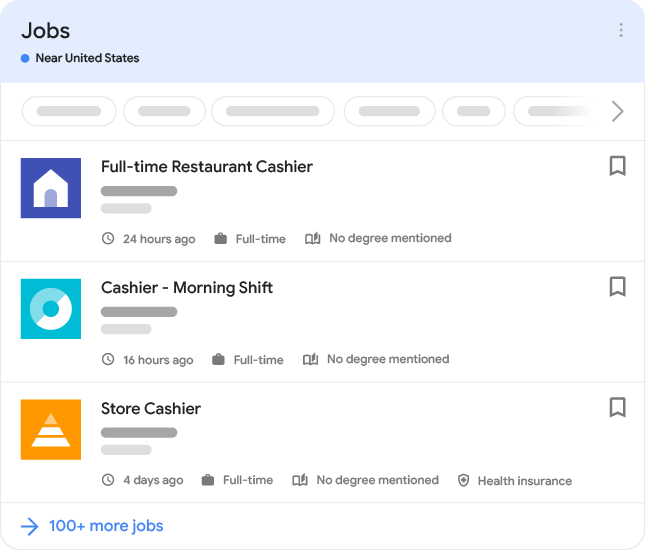
Для работодателей и владельцев сайтов с вакансиями эта функция дает много преимуществ:
- Более интерактивные результаты: Ваши вакансии могут отображаться в интерфейсе поиска работы в Google с вашим логотипом, отзывами, рейтингами и подробностями о вакансии.
- Больше мотивированных кандидатов: Новый пользовательский интерфейс позволяет соискателям фильтровать вакансии по различным критериям, таким как местоположение или название должности, что означает, что вы с большей вероятностью привлечете кандидатов, которые ищут именно эту работу.
- Повышенные шансы на обнаружение и конверсию: Соискатели получат новый способ взаимодействия с вашими вакансиями и перехода на ваш сайт.
Как добавить структурированные данные
Структурированные данные — это стандартизированный формат для предоставления информации о странице и классификации контента страницы. Если вы новичок в структурированных данных, вы можете узнать больше о том,
как работают структурированные данные.
Вот обзор того, как создавать, тестировать и публиковать структурированные данные.
- Убедитесь, что Googlebot может
эффективно сканировать ваш сайт. - Если у вас есть несколько копий одной и той же вакансии на вашем сайте, размещенных по разным URL-адресам, используйте канонические URL-адреса
на каждой копии страницы. - Добавьте обязательные и рекомендуемые свойства. В зависимости от используемого формата узнайте, где вставить структурированные данные на страницу.
- Соблюдайте технические рекомендации и политики в отношении контента вакансий.
- Проверьте свой код с помощью
Инструмента проверки расширенных результатов. Вы также можете предварительно просмотреть, как ваши структурированные данные могут выглядеть в поиске Google. - Разверните несколько страниц, которые включают ваши структурированные данные, и используйте инструмент проверки URL чтобы проверить, как Google видит страницу. Убедитесь, что ваша страница доступна для Google и не заблокирована файлом robots.txt, тегом
noindexили требованиями для входа. Если страница выглядит нормально, вы можете
попросить Google повторно просканировать ваши URL-адреса. - Держите Google в курсе, используя Indexing API и отправляя карту сайта. Для URL-адресов вакансий мы рекомендуем использовать Indexing API вместо карт сайта, так как Indexing API побуждает Googlebot сканировать вашу страницу быстрее. Используйте Indexing API чтобы уведомить Google о новом URL для сканирования или о том, что контент по URL был обновлен.
Тем не менее, мы по-прежнему рекомендуем отправлять карту сайта
для охвата всего вашего сайта. Мы принимаем всю карту сайта и повторно сканируем страницы с временемlastmod
более поздним, чем время последнего сканирования этих страниц.
Примеры
Стандартная вакансия
Вот пример отдельной вакансии с использованием кода JSON-LD.
Вакансия с работой из дома
Вот пример вакансии с работой из дома с использованием кода JSON-LD.
Удаление вакансии
Чтобы удалить вакансию, которая больше не доступна, выполните следующие действия:
- Убедитесь, что ваша страница удалена, выполнив одно из следующих действий:
- Убедитесь, что свойство
validThroughзаполнено и указывает на прошедшую дату. - Полностью удалите страницу (чтобы запрос к ней возвращал код состояния
404404410или - 410
).Удалите
- Убедитесь, что свойство
- JobPosting
- Используйте Indexing API чтобы запросить удаление URL-адреса вакансии из индекса Google Search.
Мы обрабатываем весь файл sitemap и повторно сканируем страницы с
lastmodвременем, которое является более поздним, чем время последнего сканирования этих страниц.
- Используйте Indexing API чтобы запросить удаление URL-адреса вакансии из индекса Google Search.
Разметка вакансий для работы из дома
Чтобы соискателям было проще находить вакансии для удаленной работы и работы из дома, мы рекомендуем добавлять структурированные данные к вашим вакансиям для работы из дома.
Вот как вакансии для работы из дома могут отображаться в Google Search:
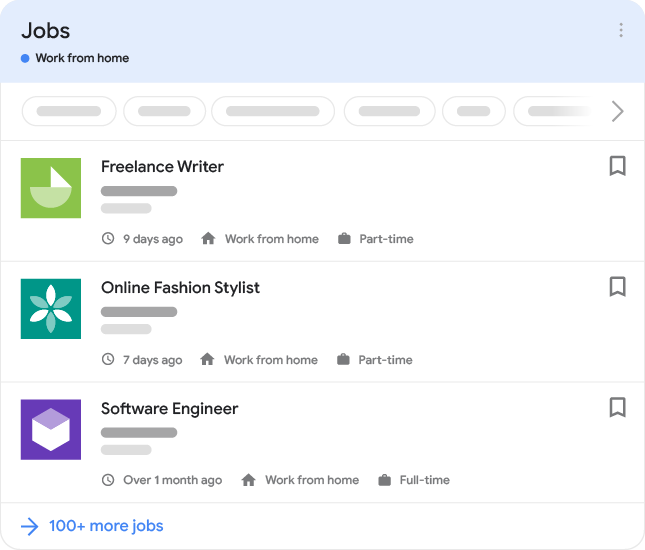
Вы также можете попробовать это в Google Search:
Существует три свойства, которые помогают Google понять, какие вакансии можно выполнять из дома:
jobLocationType: Используйте это свойство, чтобы указать, что вакансия предполагает работу из дома.applicantLocationRequirements: Используйте это свойство, чтобы указать географическое местоположение (или местоположения), в котором могут находиться сотрудники для работы из дома. Требуется как минимум одна страна.jobLocation: Используйте это свойство, чтобы указать, где физически может выполняться работа. Вам не нужно использовать это свойство, если нет физического места, где можно выполнять работу (например, офис или строительная площадка). Обратите внимание, что свойствоaddressCountryдолжно быть указано, если используется это свойство.
Вот несколько распространенных сценариев для вакансий с работой из дома:
- Работу можно выполнять из дома, но есть географические ограничения на местонахождение сотрудника. Сотруднику не нужно посещать физическое рабочее место или офис. Используйте
applicantLocationRequirementsи
jobLocationType. - Работу можно выполнять на физическом рабочем месте в Детройте, штат Мичиган, или из дома в США. Используйте
jobLocationиjobLocationType. - Работу можно выполнять на физическом объекте в Детройте или из дома в Мичигане или Техасе. Используйте
jobLocation,jobLocationTypeиapplicantLocationRequirements.
Обновите логотип вашей компании
Google использует для ваших вакансий тот же логотип, что и изображение, показанное в карточке Knowledge Graph вашей компании. Вы можете предложить изменение
если предпочитаете другой логотип, или указать предпочтительный логотип (как для панели знаний Google вашей компании, так и для ее вакансий)
используя структурированные данные.
Если у вас есть сторонний сайт вакансий, вы можете предоставить для организации логотип, отличный от изображения, показанного в панели знаний Google этой организации. Google выберет лучший логотип для отображения в результатах поиска, будь то логотип панели знаний или логотип
hiringOrganization . Свойство logo
может отображаться только на вашем сайте вакансий и не считается каноническим логотипом организации. Для получения дополнительной информации см. hiringOrganization.
Технические рекомендации
- Размещайте структурированные данные на максимально подробной странице. Не добавляйте структурированные данные на страницы, предназначенные для представления списка вакансий (например, страницы результатов поиска). Вместо этого применяйте структурированные данные к наиболее конкретной странице, описывающей одну вакансию с соответствующими деталями.
- Добавьте свойство
JobPostingдля каждой вакансии, которую вы хотите рекламировать. Структурированные данные должны находиться на той же странице, что и описание вакансии, которое соискатели могут прочитать в своем браузере. - Большинство свойств должны встречаться на странице вакансии только один раз, если в описании специально не указано, что их можно добавлять более одного раза.
Если вы решили использовать файлы sitemap, чтобы информировать Google об изменениях в URL-адресах вакансий, следуйте общим рекомендациям по sitemap. Кроме того, к URL-адресам вакансий применяются следующие рекомендации по sitemap.
- Убедитесь, что Googlebot может получить доступ к URL-адресам в файле sitemap. Убедитесь, что URL-адреса, которые вы включаете в sitemap, не находятся за брандмауэром и не запрещены вашим файлом robots.txt.
- Используйте максимально точное время для значений
<lastmod>(sitemap),
<pubDate>(RSS) или<updated>(Atom), чтобы указать, когда страница была добавлена или изменена. Значение должно быть временем последнего изменения контента по данному URL. Важно использовать точное время; пропускная способность сканирования ограничена, и точное время помогает нам избежать повторного сканирования страниц, которые не изменились. Кроме того, чем больше Google приходится сканировать ваши страницы, тем выше будет нагрузка на ваши серверы. - Не включайте в sitemap страницы результатов поиска, страницы списков или другие динамические страницы.
- URL-адреса в sitemap должны включать
каноническую страницу
для каждой вакансии.
Политики в отношении контента вакансий
Мы создали политики в отношении контента вакансий, чтобы гарантировать, что наши пользователи находят вакансии, которые являются открытыми, актуальными и на которые легко откликнуться.
Общие рекомендации по структурированным данным и
политики в отношении спама для поиска Google
также применяются к вакансиям. Если мы обнаружим контент, нарушающий эти политики, мы отреагируем соответствующим образом, что может включать принятие
ручное действие и удаление вакансии(й) из поиска работы в Google.
Нерелевантный контент
Разметка JobPosting должна использоваться только на страницах, содержащих одну вакансию. Мы не разрешаем использовать разметку JobPosting на любых других страницах, включая страницы, на которых нет вакансий.
Неполный контент
Мы не разрешаем размещать вакансии с неполным описанием.
Введение в заблуждение
Мы не разрешаем вакансии, которые пытаются выдать себя за другое лицо или организацию, или иным образом участвуют в деятельности, направленной на обман, мошенничество или введение других в заблуждение. Это включает ложное подразумевание аффилированности или одобрения со стороны другого лица или организации. Это также включает использование нескольких учетных записей для обхода наших политик, блокировок или иного нарушения ограничений, наложенных на вашу учетную запись.
Примеры нарушений политики включают:
- Вакансии или контент, которые представляют работодателя неточным, нереалистичным или неправдивым образом.
- Размещение вакансий для фальшивых или несуществующих должностей. Это включает вакансии, основная цель которых — сбор информации о соискателях, а не поиск сотрудников.
- Названия должностей, описания и другие детали, которые используют наполнение ключевыми словами
для манипулирования результатами поиска. - Предоставление ложных данных о местоположении, которые не соответствуют фактическому месту работы.
- Размещение вакансий от имени организации или компании без авторизации.
Ненормативная лексика
Мы не разрешаем вакансии, содержащие непристойную, нецензурную или оскорбительную лексику.
Реклама, замаскированная под вакансию
Мы не разрешаем рекламный контент, замаскированный под вакансию, например, размещенный третьей стороной (например, партнерские программы).
Запросы на удаление по юридическим причинам
Если Google получает жалобу на то, что контент в вакансии может нарушать закон, вакансия будет обработана в соответствии с политиками поиска.
Вакансии с истекшим сроком действия
Мы не разрешаем вакансии с истекшим сроком действия. В идеале вам следует
удалять вакансии с истекшим сроком действия со своего веб-сайта. Если вы предпочитаете не удалять их, вам необходимо убедиться, что свойство validThrough заполнено и указывает на прошедшую дату. Это помогает пользователям просматривать только те вакансии, по которым еще идет наем.
Вакансии без возможности отклика
Мы не разрешаем вакансии, на которые нельзя откликнуться. Это включает:
- Вакансии, рекламирующие мероприятия, такие как приглашения на ярмарки вакансий.
- Вакансии, требующие входа в систему для просмотра описания. Пользователи должны иметь возможность видеть детали вакансии без необходимости входа в систему.
Сбор резюме
Издатели могут собирать резюме только на открытые вакансии. Мы можем удалять запросы, которые собирают данные кандидатов, но не связаны с текущим наймом.
Запросы на работу
Вакансии должны описывать открытую позицию, включать необходимые квалификации и другую информацию, актуальную для пользователя, ищущего работу. Мы не разрешаем вакансии, где соискатель предлагает выполнить работу.
Требуется оплата
Мы не разрешаем вакансии, требующие оплаты от соискателей.
Редакционный контент
Чтобы наши пользователи могли понять ваш контент и легко откликнуться на вакансию, мы не разрешаем контент, который засоряет страницу мешающим текстом и изображениями, чрезмерной и отвлекающей рекламой или контентом, который не добавляет никакой ценности вакансии.
Мы не разрешаем грамматически некорректный контент. Соблюдайте базовые правила грамматики, применимые к языку или системе письма вашего контента (например, использование правильного регистра, избегание написания текста заглавными буквами), и используйте только широко понятные акронимы или аббревиатуры.
Определения типов структурированных данных
В этом разделе описаны типы структурированных данных, связанные с вакансиями.
Вы должны включить обязательные свойства, чтобы ваш контент мог отображаться в поиске работы в Google. Вы также можете включить рекомендуемые свойства, чтобы добавить больше информации о вашем контенте, что может улучшить пользовательский опыт.
JobPosting
Полное определение JobPosting доступно по адресу
schema.org/JobPosting. Поддерживаемые Google свойства:
| Обязательные свойства | |
|---|---|
datePosted | Оригинальная дата публикации вакансии работодателем в формате |
description | Полное описание вакансии в формате HTML. Описание Дополнительные рекомендации:
|
hiringOrganization | Организация, предлагающая вакансию. Это должно быть название компании (например, “Starbucks, Inc”), а не конкретное место, которое нанимает (например, “Starbucks on Main Street”). Например: Если организация нанимает анонимно (например, кадровое агентство от имени анонимного работодателя или работодатель напрямую на вашей платформе), используйте значение Логотипы на сторонних сайтах вакансий Если у вас есть сторонний сайт вакансий, вы можете предоставить логотип для данной организации, отличный от изображения, показанного в панели знаний Google организации. Чтобы запросить другой логотип для нанимающей организации, добавьте свойство logo в массив |
jobLocation | Физическое местоположение(-я) бизнеса, куда сотрудник будет приходить на работу (например, офис или рабочая площадка), а не место, где была размещена вакансия. Включите как можно больше свойств. Чем больше свойств вы предоставите, тем выше качество вакансии для наших пользователей. Обратите внимание, что вы должны включить свойство Несколько физических локаций Если у вакансии несколько локаций, добавьте несколько свойств Удаленная работа Для вакансий, на которых сотрудник может или должен работать удаленно 100% времени, вы должны использовать |
title | Название вакансии (не заголовок объявления). Например, “Инженер-программист” или “Бариста”. Например: Рекомендации:
|
| Рекомендуемые свойства | |
|---|---|
applicantLocationRequirements | Географическое местоположение(-я), в котором могут находиться сотрудники, чтобы иметь право на работу из дома. В описании вакансии должно быть четко указано, что соискатель может находиться в определенных географических местоположениях. Это свойство требуется, если соискатели могут находиться в одном или нескольких географических местоположениях, а вакансия является 100% удаленной. Следующий пример предполагает работу, которую можно выполнять удаленно из любой точки Соединенных Штатов: Следующий пример предполагает работу, которую можно выполнять удаленно из Канады или на физическом рабочем месте в Детройте, штат Мичиган: |
baseSalary | Фактическая базовая заработная плата для данной вакансии, предоставленная работодателем (не оценка). Для
Например: Чтобы указать диапазон заработной платы, определите |
directApply | Указывает, позволяет ли URL-адрес, связанный с этой вакансией, подать заявку напрямую. Мы определяем опыт прямой подачи заявки с точки зрения действий, которые требуются от пользователя для отклика на вакансию. Это означает, что пользователю предлагается короткий и простой процесс подачи заявки на вашей странице без лишних промежуточных шагов. Если пользователю приходится нажимать «подать заявку», заполнять форму, входить в систему или авторизоваться более одного раза в процессе подачи, это означает, что вы не предлагаете опыт прямой подачи заявки. Скорее всего, вы предлагаете опыт прямой подачи заявки, если предоставляете один из следующих вариантов:
|
employmentType | Тип занятости. Например: Выберите одно или несколько из следующих значений с учетом регистра:
Вы можете включить более одного свойства |
identifier | Уникальный идентификатор вакансии от нанимающей организации. Например: |
jobLocationType | Установите для этого свойства значение Требования
В следующем примере показано, что сотрудник может физически работать на рабочем месте, расположенном в Тусоне, штат Аризона, ИЛИ может работать удаленно в пределах США: |
validThrough | Дата истечения срока действия вакансии в формате Если срок действия вакансии не ограничен или вы не знаете, когда она истечет, не включайте это свойство. Если вакансия заполнена до наступления даты истечения срока, удалите вакансию. |
Свойства образования и опыта (бета)
В дополнение к рекомендуемым свойствам JobPosting вы можете добавить следующие бета-свойства, чтобы предоставить больше информации об образовании и опыте для вакансии. Поскольку мы все еще разрабатываем способы использования этой информации, вы можете не увидеть немедленного появления или эффекта в Google Search.
Вот пример вакансии, требующей степени бакалавра и трех лет опыта.
| Рекомендуемые свойства (бета) | |
|---|---|
educationRequirements |
Образовательный фон, необходимый для вакансии. Если нет никаких требований к образованию, используйте значение Это свойство можно повторять в массиве. Например: |
educationRequirements.credentialCategory | Уровень образования, требуемый для вакансии. Используйте одно из следующих значений:
В дополнение к добавлению этого свойства, продолжайте описывать требования к образованию в свойстве |
experienceRequirements |
Опыт, требуемый для вакансии. Если нет никаких требований, используйте значение В дополнение к добавлению этого свойства, продолжайте описывать требования к опыту в свойстве |
experienceRequirements.monthsOfExperience | Минимальное количество месяцев опыта, требуемое для вакансии. Если существуют более сложные требования к опыту, используйте опыт, который представляет минимальное количество, требуемое для кандидата. Например:
|
experienceInPlaceOfEducation | Boolean Если установлено значение true, это свойство указывает, принимает ли вакансия опыт вместо формальной квалификации. Если установлено значение true, вы должны включить оба свойства: |
Устранение неполадок
Если у вас возникли проблемы с внедрением или отладкой структурированных данных, вот несколько ресурсов, которые могут вам помочь.
- Если вы используете систему управления контентом (CMS) или кто-то другой занимается вашим сайтом, попросите их о помощи. Обязательно перешлите им любое сообщение из Search Console, в котором подробно описана проблема.
- Google не гарантирует, что функции, использующие структурированные данные, появятся в результатах поиска. Список распространенных причин, по которым Google может не показывать ваш контент в виде расширенного результата, см. в
Общие рекомендации по структурированным данным. - Возможно, в ваших структурированных данных есть ошибка. Проверьте
список ошибок структурированных данных
и отчет о нераспознаваемых структурированных данных. - Если вы получили меры, принятые вручную, в отношении структурированных данных на вашей странице, структурированные данные на этой странице будут игнорироваться (хотя страница все равно может появляться в результатах поиска Google). Чтобы исправить
проблемы со структурированными данными, используйте отчет о мерах, принятых вручную. - Просмотрите рекомендации еще раз, чтобы определить, соответствует ли ваш контент правилам. Проблема может быть вызвана спам-контентом или спам-разметкой. Однако проблема может быть не синтаксической, поэтому инструмент проверки расширенных результатов не сможет ее выявить.
- Устранение неполадок с отсутствующими расширенными результатами / падением общего количества расширенных результатов.
- Дайте время на повторное сканирование и индексацию. Помните, что после публикации страницы Google может потребоваться несколько дней, чтобы найти и просканировать ее. По общим вопросам сканирования и индексации см.
Часто задаваемые вопросы по сканированию и индексации в Google Поиске. - Задайте вопрос на форуме Google Search Central.
Если ваша вакансия не появляется в результатах поиска вакансий или если вы получили меры, принятые вручную, за
спам-разметку структурированных данных в Search Console, попробуйте устранить наиболее распространенные проблемы. Если проблемы сохраняются, обязательно ознакомьтесь с нашими рекомендациями.
Структурированные данные на неправильной странице
ошибка Причина проблемы: страница со списком вакансий (страница результатов поиска, содержащая одну или несколько вакансий) содержит структурированные данные JobPosting
на странице. Структурированные данные JobPosting
должны находиться только на странице вакансии (странице, содержащей одну вакансию и не являющейся страницей результатов поиска). Возможно, вы получили сообщение в Search Console: “Нарушение политики в отношении структурированных данных – Страница списка не должна содержать структурированные данные для отдельных вакансий”. готово
- Исправление проблемы
Удалите структурированные данныеJobPosting
со страницы списка. Размещайте структурированные данныеJobPosting - только на страницах, посвященных одной вакансии.
После устранения проблемы.
отправьте сайт на повторную проверку
Контент не соответствует структурированным данным ошибкаПричина проблемы : страница содержит контент, который не соответствует структурированным данным на этой странице. Например, название вакансии на странице не совпадает со значением, указанным для свойства title
. Также может присутствовать спам-контент, например, кликбейтные заголовки и описания, вакансия кажется поддельной или вакансия не является репрезентативной
для реальной работы.
Другой пример — когда зарплата указана в разметке, но отсутствует на странице вакансии. Это также является нарушением рекомендаций по контенту, поскольку вся информация в разметке должна быть видна на странице вакансии. Полный список примеров см. в примерах внаших правилах в отношении контента
. Возможно, вы получили сообщение в Search Console: “Нарушение политики в отношении структурированных данных – Контент на страницах отличается от структурированных данных на странице”. готово
- Исправление проблемы
- Убедитесь, что структурированные данные соответствуют фактическому контенту на странице, репрезентативны для предлагаемой работы и не вводят пользователей в заблуждение. Используйте
инструмент проверки URL - , чтобы убедиться, что контент виден на отрендеренной странице (отрендеренная страница — это то, как Google видит вашу страницу).
После устранения проблемы.
отправьте сайт на повторную проверку
Просроченные вакансии все еще активны ошибкаПричина проблемы
- : пользователи все еще могут получить доступ к странице через поиск вакансий в Google, даже если срок действия вакансии истек. Обычно это происходит по следующим причинам:
СвойствоvalidThrough - отсутствует или не установлено на прошедшую дату.
- Страница все еще активна.
Процесс подачи заявки на вакансию перенаправляет на страницу с истекшим сроком действия вакансии.Структурированные данные
JobPosting
все еще присутствуют на странице, даже если срок действия вакансии истек. Возможно, вы получили сообщение в Search Console: “Нарушение политики в отношении структурированных данных – Структурированные данные JobPosting для просроченной вакансии”.
- готово
- Исправление проблемы
Удалите просроченную вакансию, выполнив одно из следующих действий: Убедитесь, что свойствосвойство заполнено и относится к прошлому. - Полностью удалите страницу (чтобы при запросе она возвращала статус
404или410). - Удалите
JobPostingструктурированные данные со страницы.
- Исправление проблемы
- Держите Google в курсе событий с помощью Indexing API.
- После устранения проблемы
отправьте сайт на повторное рассмотрение.
Отсутствует кнопка подачи заявки
ошибка В чем причина проблемы: у пользователя нет возможности откликнуться на вакансию на странице с предложением о работе. Вы могли получить следующее сообщение из Search Console: “Нарушение политики в отношении структурированных данных – Невозможно отправить заявку на странице предложения о работе.”
готово Устраните проблему
- Убедитесь, что на странице предусмотрен способ для пользователей откликнуться на вакансию.
- После устранения проблемы
отправьте сайт на
повторное рассмотрение.
Логотип указан неверно
ошибка В чем причина проблемы: у вашего сайта нет панели знаний Google либо в ней отображается некорректный логотип. Google использует для ваших вакансий тот же логотип, который показывается в карточке панели знаний вашей компании. Дополнительные сведения о том, как Google выбирает логотип, см. в разделе
Обновить логотип компании.
готово Устраните проблему
Эту проблему можно исправить двумя способами:
- Убедитесь, что вы указали правильный логотип с помощью свойства
hiringOrganization.logo.
Убедитесь, что соотношение ширины и высоты изображения находится в диапазоне от 0.75 до 2.5. Обновление структурированных данных происходит быстрее, чем обновление панели знаний Google, и не требует подтверждения прав на панель знаний. - Предложить изменение для своей панели знаний. Обновление панели знаний дает больше контроля над тем, как ваша организация представлена в Google, однако это может занять больше времени. Если вам нужно быстро исправить проблему с логотипом, добавьте свойство
hiringOrganization.logo.
Местоположение работы отсутствует или указано неверно
ошибка В чем причина проблемы: Google не распознает значение (-я), указанное для свойств jobLocation, addressLocalityили addressRegion . Google пытается сопоставить информацию о местоположении с реальным физическим адресом, но переданные данные либо отсутствуют, либо некорректны.
готово Устраните проблему
- Убедитесь, что структурированные данные содержат значения для
jobLocation,
addressLocalityилиaddressRegion(в зависимости от локации применимы не все свойства местоположения). - Проверьте исправление местоположения:
- Откройте инструмент Rich Results Test.
- Введите URL вакансии в поле проверки URL.
- Нажмите Проверить.
- Нажмите Предварительный просмотр.
Успешно: инструмент проверки расширенных результатов показывает правильное местоположение вакансии в инструменте предварительного просмотра поиска Google.
Повторить попытку: инструмент проверки расширенных результатов возвращает значение “false” для местоположения вакансии в предварительном просмотре поиска Google. Убедитесь, что указано реальное местоположение.
Мониторинг расширенных результатов с помощью Search Console
Search Console — это инструмент, который помогает отслеживать эффективность ваших страниц в результатах поиска Google. Вам не обязательно регистрироваться в Search Console, чтобы ваши страницы попадали в результаты поиска Google, но это поможет понять и улучшить то, как Google воспринимает ваш сайт. Мы рекомендуем проверять Search Console в следующих случаях:
- После первого внедрения структурированных данных
- После выпуска новых шаблонов или обновления кода
- При периодическом анализе трафика
После первого внедрения структурированных данных
После того как Google проиндексирует ваши страницы, проверьте их на наличие проблем с помощью соответствующего отчета
Rich result status report. В идеале количество валидных элементов должно увеличиться, а невалидных — остаться прежним. Если вы обнаружите проблемы в структурированных данных:
- Исправьте невалидные элементы.
- Проверьте активный URL-адрес чтобы узнать, сохраняется ли проблема.
- Запросите проверку используя отчет о статусе.
После выпуска новых шаблонов или обновления кода
При внесении существенных изменений на сайт следите за увеличением количества недействительных элементов структурированных данных.
- Если вы видите увеличение количества недействительных элементов, возможно, вы внедрили новый шаблон, который не работает, или ваш сайт взаимодействует с существующим шаблоном новым и некорректным образом.
- Если вы видите уменьшение количества действительных элементов (которое не сопровождается увеличением количества недействительных), возможно, вы больше не внедряете структурированные данные на свои страницы. Используйте
инструмент проверки URL чтобы выяснить причину проблемы.
Периодический анализ трафика
Анализируйте трафик Google Search с помощью отчета об эффективности. Данные покажут, как часто ваша страница появляется в результатах поиска в виде расширенного результата, как часто пользователи нажимают на нее и какова ваша средняя позиция в результатах поиска. Вы также можете автоматически получать эти результаты с помощью API Search Console.
Используйте пользовательские параметры UTM в Google Analytics
Используйте наши пользовательские
параметры UTM для отслеживания посещений после того, как пользователь перешел с подробной страницы вакансии на ваш сайт. Вы можете использовать эти параметры с
Google Analytics
или другими сторонними инструментами отслеживания:
Если вы столкнулись с неожиданными колебаниями или несоответствиями в трафике, используйте
средство устранения неполадок для выявления и решения проблем.
Доступность по регионам
Мы рады расширить возможности поиска работы в Google на большее количество регионов по всему миру. В настоящее время эта функция доступна в следующих регионах.
- Азия: Доступно в следующих странах:
- Бангладеш
- Гонконг
- Индия
- Индонезия
- Япония
- Казахстан
- Кыргызстан
- Малайзия
- Пакистан
- Филиппины
- Сингапур
- Шри-Ланка
- Тайвань
- Таиланд
- Узбекистан
- Вьетнам
- Европа: Доступно в следующих странах:
- Австрия
- Беларусь
- Бельгия
- Дания
- Франция
- Германия
- Греция
- Италия
- Нидерланды
- Португалия
- Россия
- Испания
- Швейцария
- Великобритания
- Латинская Америка: Доступно во всем регионе
- Ближний Восток и Северная Африка: Доступно в следующих странах:
- Алжир
- Бахрейн
- Египет
- Ирак
- Иордания
- Кувейт
- Ливан
- Ливия
- Марокко
- Оман
- Палестина
- Катар
- Саудовская Аравия
- Тунис
- Объединенные Арабские Эмираты
- Северная Америка: Доступно во всем регионе
- Африка к югу от Сахары: Доступно во всем регионе
Как мы это применяем
Job posting markup is high-value and high-maintenance. Expired postings must be removed promptly, so we only recommend it to clients with a system that can guarantee that.
Связанные услуги